Webhooks allow Bizzy to send new Agent leads directly to your system as soon as they’re generated.
This is the easiest way to automate lead delivery and integrate Bizzy into your existing workflow.
Bizzy uses Svix to manage webhook delivery, retry logic, testing and logs, so you can monitor everything in one place.
What you’ll receive via webhook
To receive Agent leads, you’ll need to subscribe to the event:
agent.lead.new
Every time a new lead is generated (or approved, depending on your configuration), Bizzy will send a webhook containing all lead details.
Step 1: Create a webhook endpoint in Bizzy
- Go to Settings
- Click Integrations
- Open Webhooks
- Click Add webhook
- Enter your webhook URL (the endpoint where you want Bizzy to send events)
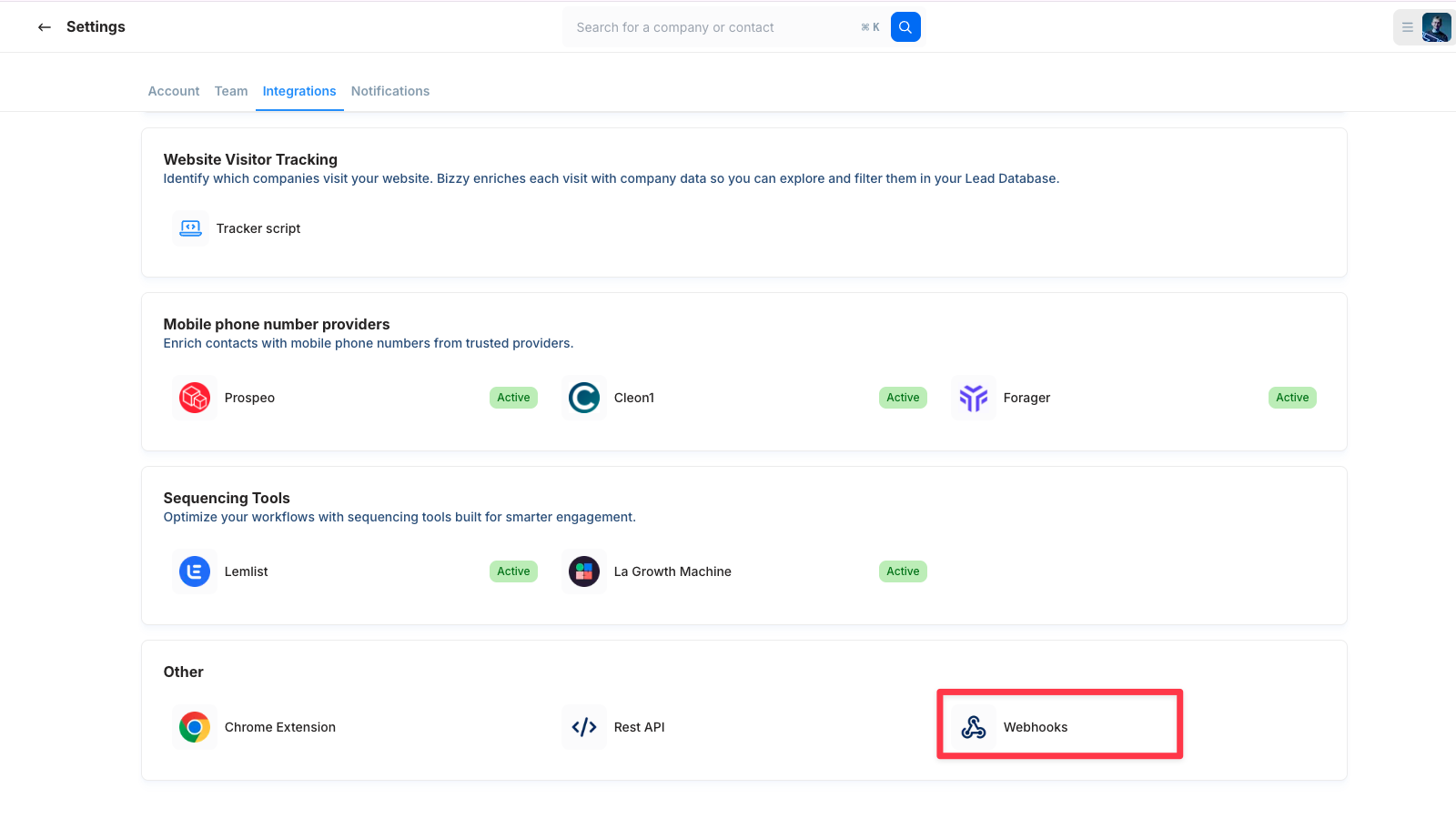
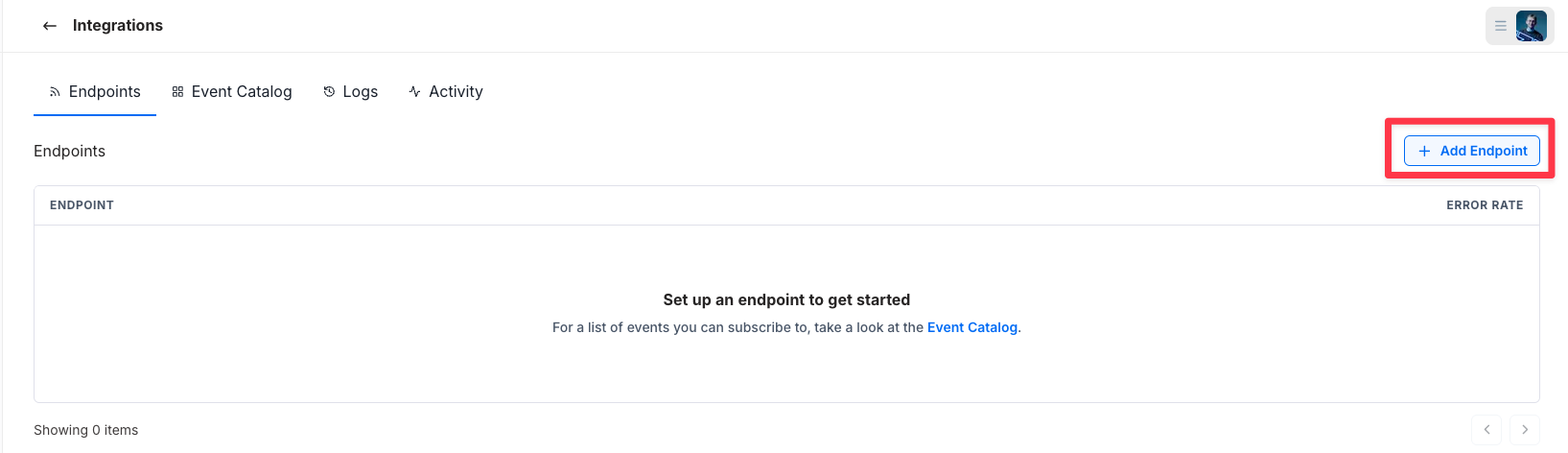
Note: If you don’t see the Webhooks option in Settings > Integrations, please contact your Bizzy contact person to enable it.
Step 2: Subscribe to the Agent lead event
- Select the event agent.lead.new
- Save your changes
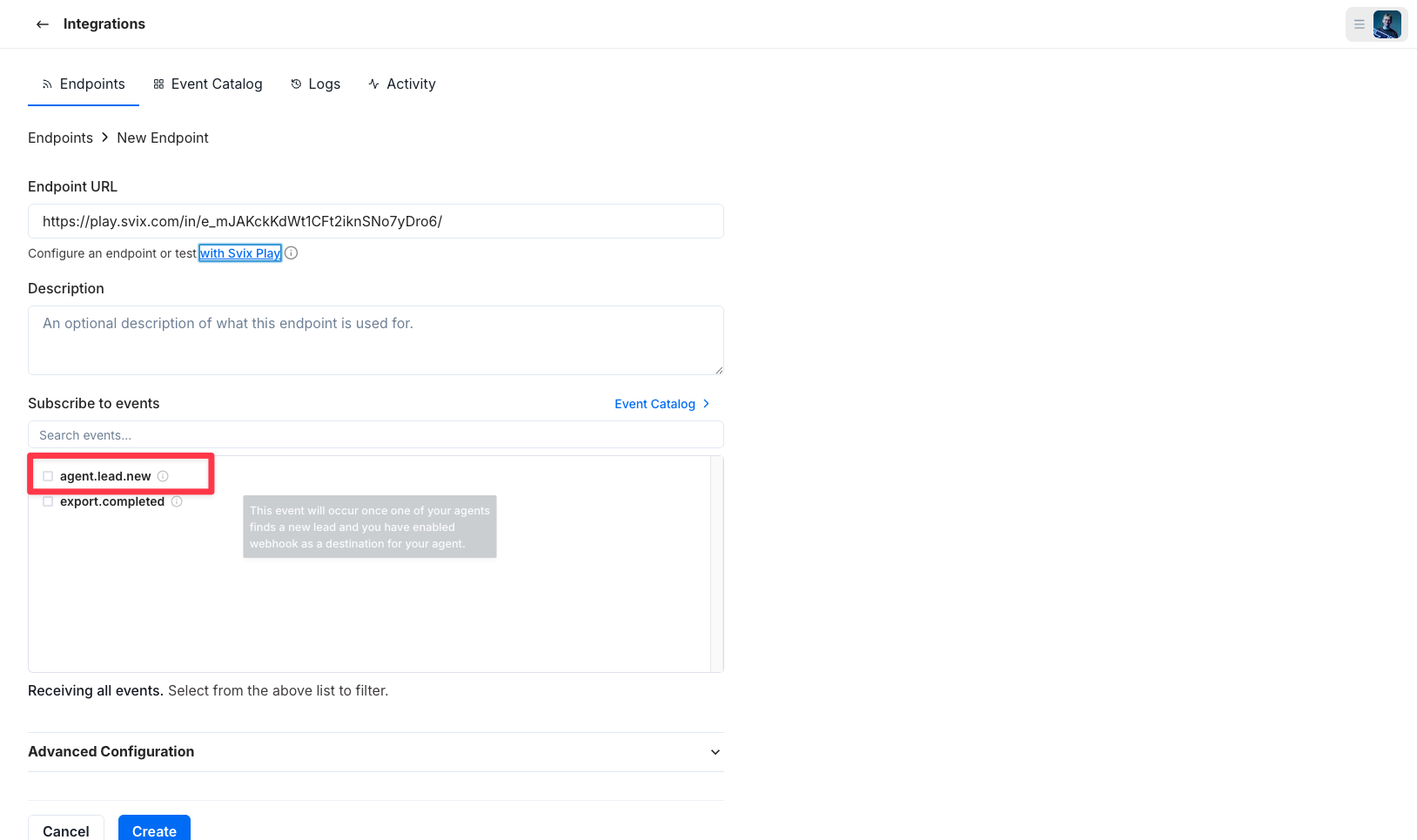
✅ Your webhook is now subscribed and ready to receive Agent leads.
Step 4: Connect the webhook in your Agent settings
- Open your Agent
- Go to Agent settings
- Click Destinations
- Connect your webhook
- Choose one of the lead delivery options:
- Approved leads only
- All leads
One toggle is always selected, so Bizzy knows which lead stream to send to your webhook.
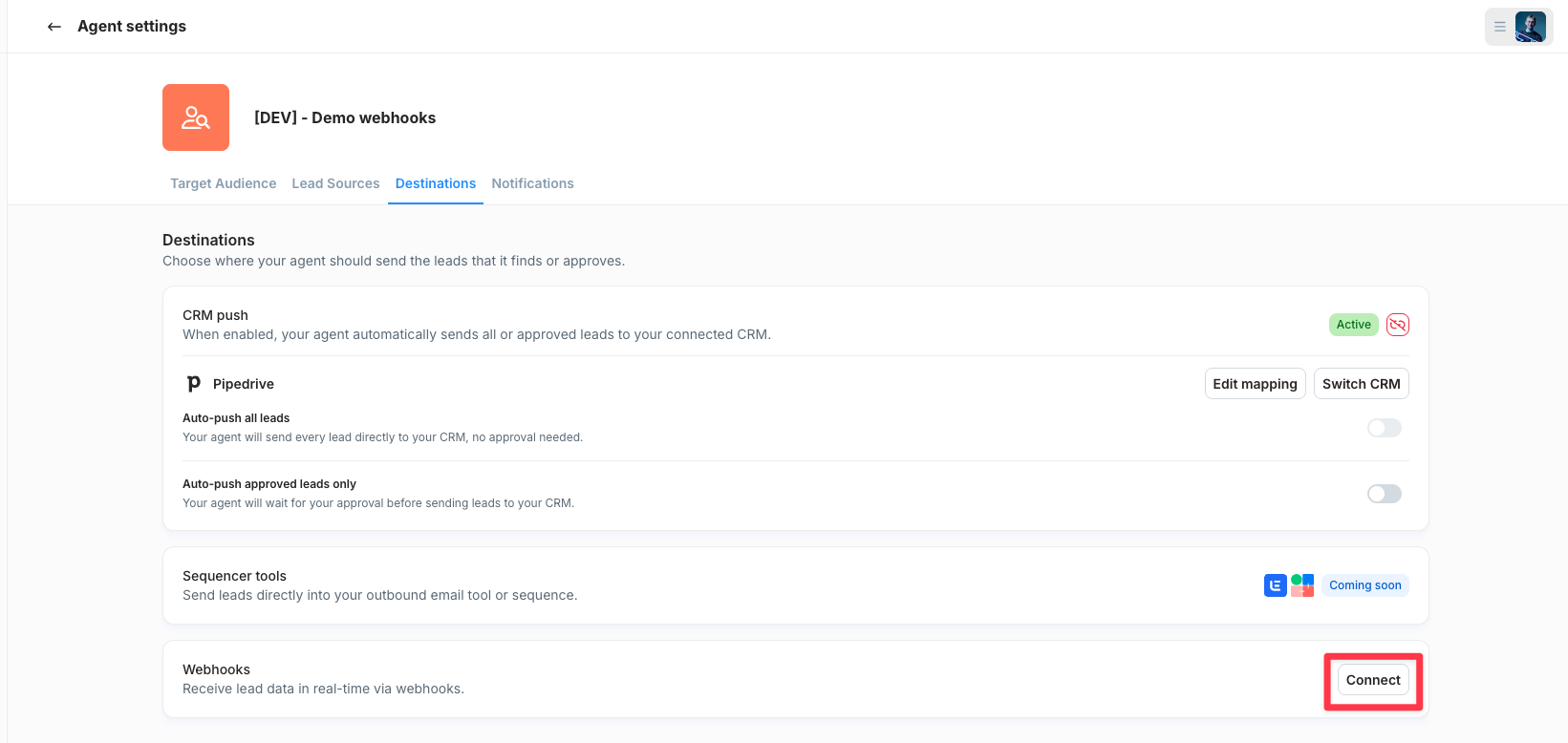
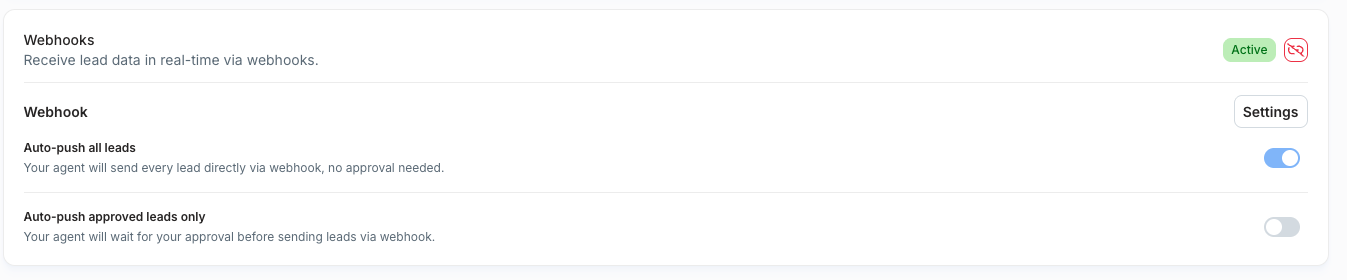
Note: If you choose approved leads only, Bizzy will only send leads after they’re reviewed and approved inside the Agent.
Webhook delivery & monitoring (Svix)
Bizzy uses Svix to handle webhook delivery. This means:
- Built-in retry logic (automatic resending if your endpoint fails)
- A full activity feed
- Event logs and delivery status
- Webhook testing tools
This makes it easy to troubleshoot, verify delivery, and confirm your endpoint is responding correctly.
Tip: If you're testing your integration, Svix logs are the fastest way to see exactly what Bizzy sent and how your endpoint responded.
Webhook payload format
When Bizzy sends a new Agent lead, you’ll receive a JSON payload like this:
{
  "agentId": 12345,
  "data": {
    "company": {
      "activities": [
        {
          "activity": "Software Development"
        },
        {
          "activity": "Artificial Intelligence"
        },
        {
          "activity": "Sales Automation"
        }
      ],
      "address": {
        "country": "Belgium",
        "locality": "Ghent",
        "number": "5A",
        "postalCode": "9000",
        "street": "Dok-Noord 5A"
      },
      "contact": {
        "email": "info@bizzy.ai",
        "phone": null
      },
      "employees": {
        "amount": 28,
        "estimation": null
      },
      "establishedSince": "2021-06-29T00:00:00.000Z",
      "logo": "<https://cdn.bizzy.ai/logos/bizzy-logo.png>",
      "name": "Bizzy.ai",
      "revenue": {
        "amount": null,
        "estimation": "Bucket0_1M"
      },
      "socials": {
        "facebook": "<https://www.facebook.com/bizzyinsights>",
        "instagram": "<https://www.instagram.com/bizzyinsights/>",
        "linkedin": "<https://www.linkedin.com/company/bizzyinsights/>",
        "x": "<https://twitter.com/bizzyinsights>",
        "youtube": null
      },
      "vatNumber": "BE0770493071",
      "website": "bizzy.ai"
    },
    "coreBusiness": "AI-powered sales prospecting and lead generation platform for B2B companies.",
    "employee": {
      "email": "hendrik@bizzy.org",
      "firstName": "Hendrik",
      "jobTitle": "Co-Founder",
      "lastName": "Keeris",
      "linkedInUrl": "<https://be.linkedin.com/in/hendrik-keeris-343377163>",
      "mobileNumber": "+32 478 37 57 06"
    },
    "icpQualification": "Strong fit - B2B SaaS company in the sales automation space with clear need for lead generation solutions."
  },
  "type": "agent.lead.new"
}
Optional: Import your customers via the Agent API
If you want Bizzy to avoid recommending companies that are already your customers, you can import them via the Agent API.
Once enabled, Bizzy will:
- Use your customer list to detect lookalikes
- Avoid recommending existing customers as leads
Enable customer imports
- Go to Agent settings
- Open Lead sources
- Enable customer import via API
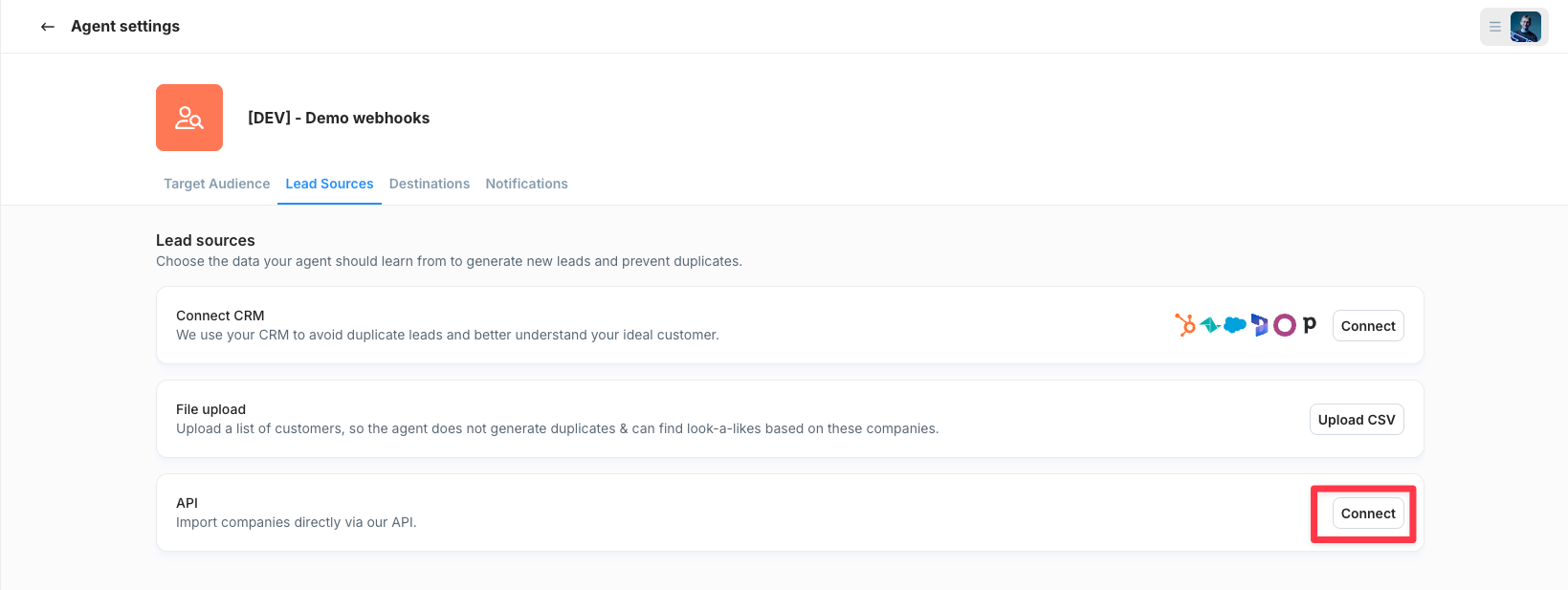
When customer import is enabled, Bizzy will display an extra button that links you directly to the Agent API documentation.
Note: You need an API key to send customers via the API.
Summary
To receive Agent leads via webhook:
✅ Create a webhook in Settings > Integrations > Webhooks
✅ Subscribe to agent.lead.new
✅ Connect it in Agent settings > Destinations
✅ Choose approved or all leads
✅ Monitor delivery and logs via Svix
Was this article helpful?
That’s Great!
Thank you for your feedback
Sorry! We couldn't be helpful
Thank you for your feedback
Feedback sent
We appreciate your effort and will try to fix the article